We offer a variety of large and small rooms for classes, meetings, and events. Here, find a list of classrooms; reservations must be made using individual calendar links for each room.

Reserve a Conference Room or LobbyReserve a Classroom


Room reservation quick tips
  • You must reserve any/all classrooms, conference rooms and/or labs.
  • Consider reserving 15-30 minutes before your event starts to set up the room and get the technology working.
  • All rooms include presentation technology. For assistance, please contact Warnell OIT.
  • Leave the room better than you found it. Put the tables/chairs back, put leftover food in break room, throw away trash. If the trash is full or you need cleaning tools, please contact the building supervisor: Sheila Adams at 706-542-7579.
Technology Assistance
  • Need a computer, webcam, or projector for your event or meeting?
  • Have a remote participant and want to know how to include them with a phone or webcam?
  • Want to check out video or camera gear?
  • Looking for that special adapter that makes your computer work with a projector?

Reserve Technology or Get Help

Looking For A Classroom Schedule?

Reserve Technology or Get Help

(requires remote.uga.edu off-campus)

1-309: Small Conference & Interview Room

Seats 6-8, 12 x 14 ft, telephone, large monitor with HDMI connectors & sound

Bring your own computer

  • You must bring your own computer to this room or check one out from us.
  • Computer attaches via HDMI cable coming from display.
  • You may need an adapter to go from your computer to HDMI.
  • Use remote to turn on the display. Choose “source” of HDMI if needed.
  • Electronic Whiteboard to the left. Connects using SmartKapp app found on Apple app store or Google Play, bluetooth, & the QR code. Drawings can be saved using a USB flash drive on the right side port.

Reservation Calendar for Room 1-309

2-201A The Keadle Conference Room: Large Conference Room

Seats 16-32, 20 x 30 ft, 1 large table, podium, conference phone (in touch panel) electric solar shades, SmartKapp bluetooth whiteboard, Integrated webcam with back wall monitor & microphone in ceiling, HDMI laptop input

Desktop computer, touch panel, ceiling projector with speakers.

NO FOOD OR DRINK. Please serve and consume your food in the lobby outside of the conference room.  

Reservation Calendar for the Keadle Conference Room

4-301: Medium Conference Room

  • Seats 12, 18 x 20 ft, large table, whiteboard wall around display, manual solar shades
  • 70″ touchscreen display with built-in computer (on upper left back)
  • HDMI, VGA & Thunderbolt inputs available
  • Conference webcam/speaker/microphone

Reservation Calendar for Room 4-301

4-132: Medium Conference Room

  • Seats 10-24, 20 x 25 ft, 1 table, podium, conference phone (in touch panel) electric solar shades,
  • Integrated webcam on back wall monitor & mic in ceiling
  • Desktop computer, touch panel, ceiling projector with speakers.
  • Conference webcam/speaker/microphone

Reservation Calendar for Room 4-132

Warnell Classroom Information

1-101 and 1-107 (Labs)

  • Web w/ mic on podium monitor
  • PC Computer/monitor w/DVD
  • Connection for laptop: VGA or HDMI
  • Projector/screen/sound
  • Seats ~ 30

1-209, 303, 306, 307 (Small Classrooms)

1-210 (Collaborative Learning Lab)

1-304 (Large Classroom)

  • Web w/ mic on podium monitor
  • PC Computer/monitor w/DVD
  • Projector (use remote)/screen/sound
  • Connection for laptop: vga or hdmi
  • Whiteboard
  • Printer
  • 10 PC student stations, laptop space
  • 1 iMac station with Adobe Cloud
  • Web w/ mic on podium monitor
  • PC computer/monitor w/Blue-Ray DVD
  • Document camera
  • 2 HD projectors/screens/sound
    • Use AMX to lower screens and turn on
    • Projector standby means it is off
  • Whiteboards
  • Connection for laptop: vga or hdmi
  • Microphone system in cabinet
  • AMX touch panel (turns on projectors)
  • Power/internet at all seats
  • Seats ~ 90

2-100 (Lecture Hall)
4-418 (Small Classroom)
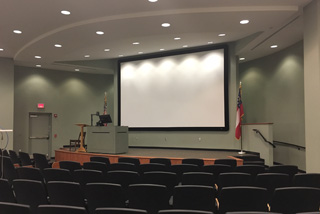
  • Monitor w/ internal webcam & mic
  • PC Computer
  • Smart Podium monitor
  • Podium with microphone, DVD
  • AMX touch panel
  • Document camera
  • Projector/screen/sound
    • Help telephone: CTL manages all equipment except Warnell computer
  • Seats ~ 300
  • Web w/ mic on podium monitor
  • Interactive AQUOS Sharp board
    • turn on with small remote control (button on board does not work)
  • PC Computer/monitor w/DVD
  • Switch buttons in cabinet to change input source
  • Connection for laptop: VGA or HDMI
  • Whiteboards
  • Seats ~ 28

4-419 (GIS Lab)
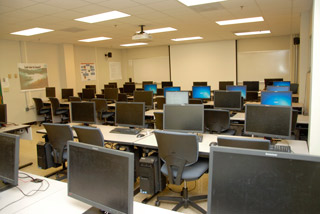
4-515 (Grad Student Computer Lab)

  • Web w/ mic on podium monitor
  • PC Computer/monitor w/DVD
  • Projector/screen
  • Whiteboards
  • Color Plotter/ Laser Printer
  • 40 student stations
  • 5 Student stations
  • Laser Printer
  • Large format plotter for posters

4-516 (Small Classroom)
4-517 (Medium Classroom)

  • Web w/ mic on podium monitor
  • AQUOS SHARP interactive screen
    • Turn on with small remote control or button on board
  • PC Computer/monitor w/DVD
  • Switch buttons in cabinet to change input source
  • Connection for laptop: VGA or HDMI
  • Whiteboards
  • Seats ~25-30
  • Web w/ mic on podium monitor
  • AQUOS SHARP interactive screen
    • Turn on with small remote control or button on board
  • PC Computer/monitor w/DVD
  • Connection for laptop: VGA or HDMI
  • 2 HD projectors/screens/sound
  • Hovercam document camera, plays through PC
  • Whiteboards
  • AMX touch panel
    • This should turn on/off projectors.
    • Use remote for smart board
  • Seats ~68

The Latest News from Warnell

Jeffrey Todd Petty Headshot
Lili Cai headshot
Jeffrey Todd Petty Headshot

Find Your Path

Shape the Future of Forestry, Conservation & Sustainability